My Blinkies :)



Creative Fabrica

Creative Teams






Artists and Store I like


















I bring you a PTU kit
Called Blue Wonder
it is all about the color blue, with hints of white silver and black


Rebecca Sinz's Tube Summer Sunset



Gothic Sapphire Match
This kit match's a tube
By Rebecca Sinz


Snow Angel Blue Fantasy
Tube by Rebecca Sinz
Matching kit
By LadyDragus


Another New kit and it's a match
For a tube by Rebecca Sinz
Called Sweet Demon
Preview of the kit


Here RS-Sweet Demon Tube
I also made show off tags


My new kit
Matches the tube by Rebecca Sinz
Called Longing Fairy


From the Depts

This tutorial is written in Corel 2023, but any version should work, this is written in hopes you have working knowledge of Paint Shop Pro or other graphics program… this is written by me, never meant to copy or look like your work…
I am using a PTU tube
By Rebecca Sinz
Called Kraken

You can find this tube
Here Kraken Tube
I am using a PTU kit
By Honored Scraps
From the Dark Depths

You can find it
Here From the Depths
Open a 750x750
Frame 6 c/p size this down by 55%
Take the tube with the tentacles, paste her and size her down by 54% pull to the bottom of the frame
65 c/p size this down by 55% pull to cover up the bottom of the tag
8 c/p size this don by 64% c/p mirror a 2nd copy and pull one to the far right of the tag, and the other to the left edge of the tag
25 c/p size this down by 60% add a high pass sharpen with these settings
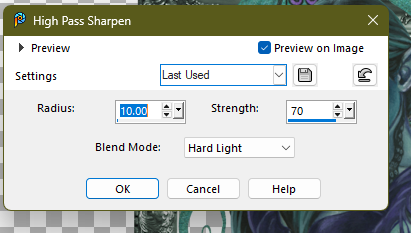
Then pull this to the right edge of the tag
36 c/p size this down by 56% pull to the left side of the tag
22 c/p size this down by 31% pull to sit by other plants
43 c/p size this down by 36% pull to the far right edge of the tag
48 c/p mirror size this down by 39% pull to sit on the shell on left edge of your tag
6 c/p size this down by 55% pull so the biggest bubble is over her face
60 c/p size this down by 30% pull to float over the flowers on right side of the tag
19 c/p size this down by 30% pull to sit on right edge of the mermaid
23 c/p size this down by 30% pull to the left side of the mermaid
37 c/p size this down by 30% pull to the middle of the tag
63 c/p size this down by 30% pull to the far right edge of the tag
Click on bottom layer of your tag
Open paper 4 draw a rectangle behind the frame, then merge into a raster layer
Click on top most layer of the tag, add a new raster layer for the copyrights and credit to kit maker, add a saying to the tag and you’re done..
Font I used is Milven (FTU PU only)
Thank you for reading my tutorial
©LadyDragus~2025
Tag for artist
Here Honored Scraps Cluster Frames


Ornamental Darkness

This tutorial is written in Corel 2023, but any version should work, this is written in hopes you have working knowledge of Paint Shop Pro or other graphics program… this is written by me, never meant to copy or look like your work…
I am using a PTU kit
By Irish Princess Designs
Called Ornamental Darkness

You can find it
Here Irish Princess Designs Store
I am also using the tube that inspired the kit
By Rebecca Sinz
Called Dark Filigree 3

Here dark-filigree
Open a 750x750 size tag
Frame 6 c/p rotate 90° to the right , then size it down by 59%
6 c/p size this down by 35% pull to the upper right top of frame
14 c/p size this down by 50% pull to the upper left top of the frame
53 c/p size this down by 55% pull to the middle right of the frame
1 c/p size this down by 28% pull to hang just under the floating castle
134 c/p size this down by 28% pull to the left edge of the frame
Dark Filigree 1 c/p size her down by 55% pull to the middle of the tag
146 c/p size this down by 16% pull to sit on left side of the tube/cat
42 c/p size this down by 16% pull to sit by skull on our tube
48 c/p size this down by 16% pull to sit on right edge of the tag
52 c/p size this down by 16% pull to sit on left side of the lamp
141 c/p size this down by 10% pull to sit on left edge of the cat
148 c/p size this down by 14% pull to the far right edge of the tag
190 c/p size this down by 14% pull to sit in front of the tube
91 c/p size this down by 7% pull to sit on left of cat with book
137 c/p size this down by 7% pull to the left of cat with book
17 c/p size this down by 7% pull to sit in front of cat with book
162 c/p size this down by 7% pull to sit in front of the left side of the book
104 c/p size this down by 7% pull to sit in between the white globe and purple globe
Click on bottom layer of your tag
Open paper 30 using your Ellipse tool draw on behind the frame none should show outside of the frame. Convert this to a raster layer
Then click on top most layer of your tag add a new raster for copyrights and a saying to the tag and you’re done…
Thank you for reading my tutorial
©LadyDragus~2024


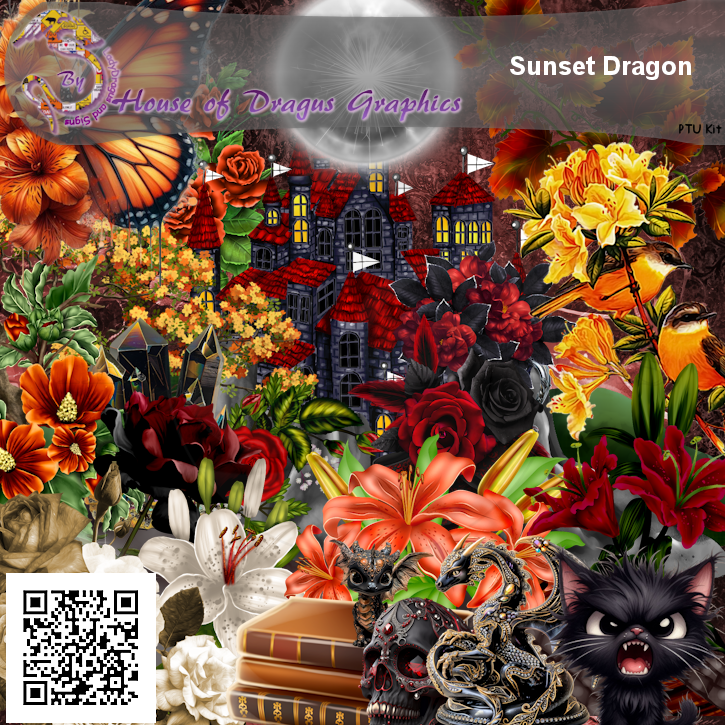


Filigree Moon 2

This tutorial is written in Corel 2021, but any version should work, this is written in hopes you have working knowledge of Paint Shop Pro or other graphics program… this is written by me, never meant to copy or look like your work…
This is a combined CT tutorial for Rebecca Sinz and Irish Princess Designs
I am using the kit
Called Filigree Moon

You can find it
Here Irish Princess Designs Payhip
I am also using the matching tube
By Rebecca Sinz
Called Filigree Moon

Here Filigree moon
Font 101! Star Lit Night (FTU font)
Open a 750x750 size tag (you can size down at the end)
Frame3 c/p size this down by 50%
127 c/p size this down by 43% pull behind the frame
Click on bottom layer of the tag
3 c/p size this down by 30% pull to the top middle of your tag, but behind the frame
Click on top most layer of your tag
Take the version of the tube w/put the moon c/p size her down by 55% pull to the middle inside of the frame add a high pass sharpen with these settings

207 c/p size this down by 22% pull to the lower left edge of your tube
89 c/p size this down by 35% pull to the right edge of your tag
65 c/p size this down by 15% pull to sit on left of the bottom purple moon
90 c/p size this down by 13% pull to the right edge of the purple bottle
87 c/p size this down by 15% pull to the left middle edge of the frame
149 c/p size this down by 15% pull to the middle of the frame
41 c/p size this down by 15% pull to sit on bottom of the moon and white clouds
17 c/p size this down by 12% pull to sit on left side of the white moon
150 c/p size this down by 13% pull to sit on right edge of books
48 c/p size this down by 13% pull to sit on top of the purple moon
141 c/p size this down by 11% pull to the left edge of books
130 c/p size this down by 13% pull to sit on left edge of black cup
180 c/p size this down by 55% pull to hang over the blue moon on top of your tag, add she same high pass sharpen that we used above.
164 c/p size this down by 55% pull to the lower left bottom of the tag most of the sparkle will be on the tube.
Add a new layer for the copyrights and credit to kit maker, make sure you have a valid License to use Rebecca’s Work, add a saying to the tag and you’re done…
Thank you for reading my tutorial
©LadyDragus~2024
Tags for Rebecca and show off of the PTU Cluster frames for the kit


Kit Match For


Stores I Sell At


Blog Trains for HODG





Forums


Blogs I follow


.gif)


















