My Blinkies :)



Creative Fabrica

Creative Teams







Artists and Store I like


















Summer in Bali

This tutorial is written in Corel 2023, but any version should work, this is written in hopes you have working knowledge of Paint Shop Pro or other graphics program… this is written by me, never meant to copy or look like your work…
I am working with a PTU kit
By Wicked Princess Scraps
Called Breezy day in Bali

You can find this in her store
Here Breezy Day in Bali
I am using a PTU tube
By Alex Prihodko

You can find this tube
He now only sells his tubes at Verymany Artist
You can get the tube Here Orange Juice
(I am using the green top and the purple bottoms of the suit to match the kit)
MPM mask 26
Here Millies PSP Madness
This is on the right side of her blog in a bulk download
Open a 750x750
92 c/p mirror size this down by 65%
134 c/p size this down by 65% pull to the far left edge of the tag
Take the colorized version of the tube we are using c/p size it down by 22% mirror pull to the bottom inside of the picture frame
143 c/p size this down by 64% pull to the bottom of the tube
4 c/p size this down by 40% pull to sit on right edge of the palm trees
100 c/p size this down by 36% pull to the middle of the tag
28 c/p size this down by 45% pull to the far left side of the dock, this will cover up the bottom of the tree’s
30 c/p size this down by 26% pull to the left of the house
91 c/p size the boat down by 47% pull to the far right edge of your tag
118 c/p size this down by 30% pull to sit on left edge of water around the boat
15 c/p size this down by 15% pull to sit on the dock
36 c/p size this down by 15% pull to sit on very right edge of the dock by the boat
84 c/p size this down by 15% pull to sit on left edge of the rocks
31 c/p size this down by 15% pull to sit on left top side of palm trees
57 c/p size this down by 15% pull to the left side of the rocks by the boat
61 c/p size this down by 15% pull to sit on the very right side of the house
20 c/p mirror size this down by 12% pull so it is sitting on the right edge of the boat
62 c/p size this down by 12% pull to sit on the water by the flowers and boat
140 c/p size this down by 12% pull to sit in the middle front of the dock
171 c/p size this down by 12% pull to sit on the left of the fruit on the dock
Click on bottom layer of the tag flood fill with paper 13 apply mask from above, merge into one layer
Click on top most layer of your tag
Add a new raster layer for the copyrights and credit to the kit maker, make sure you have a valid license to use this artwork.
Thank you for reading/ doing my tutorial
©LadyDragus~ 2024



Just a little Witchy

This tutorial is written in Corel 2021, but any version should work, this is written in hopes you have working knowledge of Paint Shop Pro or other graphics program… this is written by me, never meant to copy or look like your work…
I am using a PTU kit
By Wicked Princess Designs
Just a Little Witchy

You can find all of her kit
Here Wicked Princess Scraps~ PayHip
&
I am also using the matching tube
By Katharine
Called Sweet_Witch

You can find her tubes
Here VeryMany Artist
AORK Mask17
Open a 750x750
E1 c/p size this down by 60%, take a 2nd copy of the frame paste then size this down by 65%
34 c/p size this down by 45% pull to the upper left corner of the frames
43 c/p size this down by 30% pull to the lower right edge of the tag
42 c/p size this down by 45% pull to the upper right edge of your tag
Take the red color of the tube we are using c/p size her down by 25% pull to the middle of the frames
74 c/p size this down by 33% pull to sit on left edge of the tube
45 c/p size this down by 30% pull this to sit on top of books
99 c/p size this down by 25% pull to sit on the right edge of the tube
96 c/p size this down by 25%, and then pull to the far left side of the tag
37 c/p mirror size this down by 25% pull to the right edge of books
7 c/p size this down by 20% pull to the left side of the tag
5 c/p size this down by 24% pull to the left edge of white & red rose
81 c/p size this down by 17% pull to sit in front of rose with the eye in it
14 c/p size this down by 17% pull to sit on right of mystic ball
132 c/p size this down by 20% pull to sit in front of our tube
138 c/p size this down by 20% pull to sit on the far left of white/red rose
50 c/p size this down by 20% pull to lay on top of the 3 wallets on right side of the tag
Click on bottom layer of your tag, open paper 2 size this down to fit inside of your canvas, apply the mask from above
Merge this into one layer (this is where you should size this down to what size you wish the tag to be) normally 700x700
Thank you for reading my tutorial
©LadyDragus~ 2023
Tag for Wicked Princess and Artist


Elvin Owl

This tutorial is written in Corel 2021, but any version should work, this is written in hopes you have working knowledge of Paint Shop Pro or other graphics program… this is written by me, never meant to copy or look like your work…
I am using a PTU kit
By Wicked Princess Scraps
Called Elfish Charm

You can find all of her kits
&’Here Wicked Princess Store
I am using a PTU tube
By Verymany
Called Elf_and_Owl

You can find her tubes
Here Verymany Tubes
Rachel mask 856
Here Rachel Deisgns
Open a 750x750
Frame 2 c/p size this down by 85%
Grass 2 c/p size this down by 75% pull to the bottom of the frame
AI- Tree 1 c/p size this down by 68% pull to the right edge of the frame
Tree 3 c/p size this down by 55%
AI House c/p size this down by 23% pull to sit under the tree
Take the full size of the tube we are using c/p size her down by 25% mirror pull to the far left edge of the grass
AI-Animal 1 c/p size this down by 25% pull to sit on the left side of the tube’s dress
AI-Animal 9 c/p size this down by 15% pull to sit on left side of mushroom house
AI-Birdbath c/p size this down by 20% pull to sit on right of the fox
Mushroom c/p size this down by 11% pull to sit on the right edge of the mushroom house,
AI-Animal 8 c/p size this down by 11% pull to sit in front of mushroom house.
AI-Flower 13 c/p size this down by 11% pull to sit on right front of birdbath
AI-flower14 c/p size this down by 11% pull to the left front of the birdbath
AI-animal 3 c/p size this down by 11% pull to the middle front of the birdbath
AI-Flower 2 c/p size this down by11% pull to sit in front of animals by house.
AI-Flower 3 c/p size this down by 11% pull to sit in front of the fox
AI-Flower 4 c/p size this one down by 11% pull to sit by fox
Click on bottom layer of your tag size the tag down to what size you want it to be
Open paper 8 flood fill bottom layer apply mask from above, then merge into one layer, click on top most layer of your tag add a new layer for the credit and License information, add a saying to the tag and you’re done…
©LadyDragus~ 2023


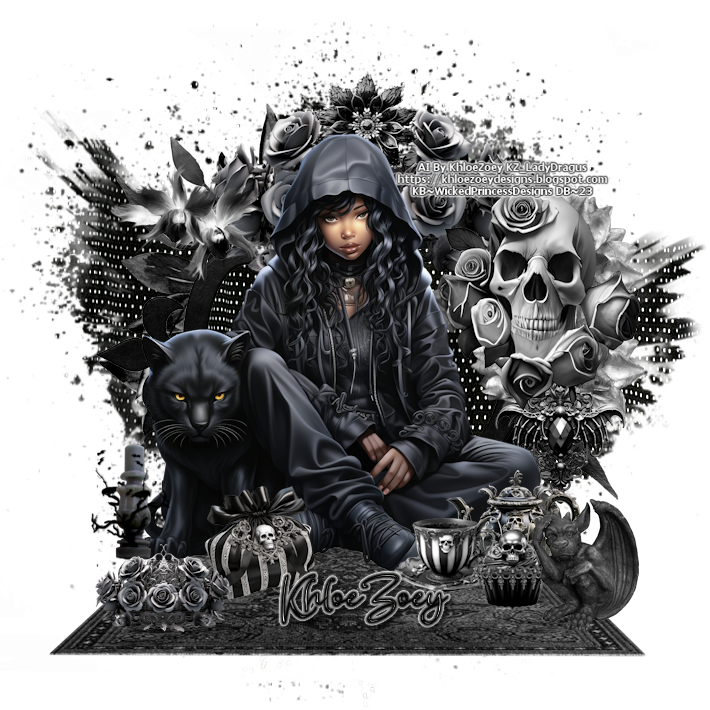


Gothic

This tutorial is written in Corel 2021, but any version should work, this is written in hopes you have working knowledge of Paint Shop Pro or other graphics program… this is written by me, never meant to copy or look like your work…
I am using a PTU kit
By Wicked Princess Scraps
Called Gothic Blues

You can find it in her store
I am using a few tubes (3 Tubes)
Wolf, Panther, and Priestess of Darkness
By Verymany

Here Verymanytubes Store
Open a 750x750
Frame 12 c/p size this down by 65%
Take paper1 paste it behind the frame pull so the window is inside of the frame crop off any showing outside of your frame
Take the tube Panther pull behind the frame size him down by 24%
Take the tube wolf c/p pull behind panther size him down by 24% pull to the upper right inside of the frame
Click on top most layer of your tag
Curtain c/p size this down by40% pull to hang on the square part of the frame on the upper right, then c/p mirror pull one to the upper left edge of the square
Flowers 37 c/p rotate 90° to the right size down by 40% pull to the upper middle of the frame
Lamp 1 c/p size this down by 40% pull to the lower left edge of the frame
Book 1 c/p size this down by 25% pull to sit in front of lamp
Take the tube Priestess of Darkness c/p mirror her size her down by 30% pull to the far right edge of the tag
Cat c/p size this down by 20% pull to sit on her cloak
Bird c/p size this down by 15% pull so he is sitting on top of the lamp
Ball1 c/p size this down by 15% pull to sit on left edge of her cloak
Bottle 2 c/p size this down by 15% pull to sit in front of books
Flower 36 c/p size this down by 15% pull to sit in front of ball and box
Candle 3 c/p size this down by 15% pull to sit on the 3rd down book
Cupcake c/p size this down by 15% pull to sit on right of bottle
Tray c/p size this down by 15% pull to sit in front of cupcake
Add a new raster layer for the copyrights and a saying to the tag, make sure you have a valid License to use Verymany’s tubes…
Thank you for reading my tutorial
©LadyDragus~2023


Guardian’s of Earth

This tutorial is written in Corel 2021, but any
version should work, this is written in hopes you have working knowledge of Paint Shop Pro or other
graphics program… this is written by me, never meant to copy or look like your
work…
I am using a PTU kit
By Wicked Princess Scraps
Called

This is exclusive to her store
Here Wicked Princess Scraps Store
I am also using the Matching tube
By Alehandra Vanhek

You can find this here
Dfly mask 0069
Here
Font 101 Star lit night
Open a 750x750
Frame 2 c/p size down by 75%
Moon c/p pull behind the frame mirror, size it down by
75%
Take the tube we are using, paste her size her down by
45%, duplicate the frame under her, then pull it on top, clean off any that is
over the top of the tube and any that show’s outside of the frame
Door 1 c/p mirror size this down by 70% pull to the
left edge of your tag
Lamp c/p size this down by 45% pull to the left edge
of the door
Well c/p mirror size this down by 65% pull to the far
right edge of your tag
Cluster 1 c/p size down by 45% pull to sit on lower
left of door
Potion c/p size this down by 25% pull to sit on left
of cluster 1
Bottle 1 c/p size this down by 25% pull to sit on left
of purple flower box
Flower 1 c/p size down b 40% pull to sit on left of
potion
Cup c/p, then size this down by 25% pull to the left of potion
Teapot c/p size down by 25% mirror sit beside cup
Ball 2 c/p size this down by 25% pull to the far left
edge of your tag
Click on bottom of your tag, this is were you can size
the whole tag down to what ever size you need
Flood fill with background 10,apply mask from above,
then merge into one layer
Click on top most layer of your tag add a new raster
layer for the copyrights and credit to the kit maker, and LIC information…
Thank you for reading my tutorial
©LadyDragus~ August 2021
Tube for artist and kit maker


Kit Match For


Stores I Sell At


Blog Trains for HODG






Forums


Blogs I follow


.gif)


















