My Blinkies :)



Creative Fabrica

Creative Teams









Artists and Store I like

















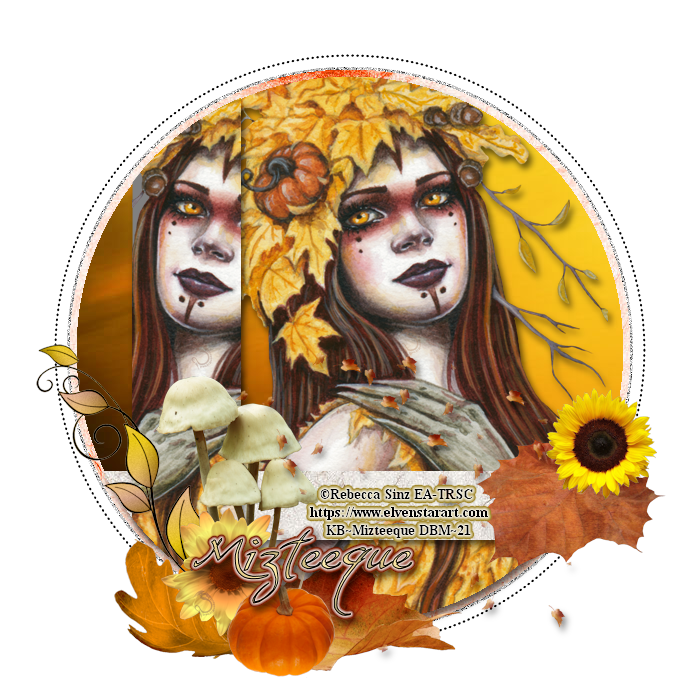
Welcome Autumn 2

This tutorial is written in Corel 2021, but any
version should work, this is written in hopes you have working knowledge of Paint Shop Pro or other
graphics program… this is written by me, never meant to copy or look like your
work…
I am using a PTU tube
By Rebecca Sinz
Autumn Dryad

You can find her tubes
Here Rebecca Sinz Tubes
I am using a FTU kit
By MizTeeques
Called Autumn Delight

You can find all her freebies
Here MizTeeque's Blog
I am using a FTU template
By Sylly Creationz “Circle”
Unzip the template
Shift+D to duplicate as not to mess up the original
Remove the copyright layer
Make the canvas size 700x700
Dark grey
circle flood fill with paper 10
Black circle flood fill with paper 7
Click on gray rectangle, paste the tube where her face
and hand is showing, crop off any outside of the rectangle, merge that down
into one layer
Add this drop shadow
Vertical 5
Horizontal 3
Opacity 60
Blur 10
Color black
Click back on black circle layer paste the tube again,
but mirror and clean off any showing outside of the circle , add the drop
shadow from above
Lt grey rectangle flood fill with paper 9 add drop
shadow from above
Click on top layer of your tag
E35 c/p size this down by 41% pull to sit on right of
half tube
E3 c/p size this leaf down by 35% pull to bottom of
mushrooms
E2 c/p mirror size this leaf down by 25% pull to the
bottom of mushrooms
E1 c/p size down by 25% pull to sit on edge of ltgrey
rectangle
E17 c/p then size
it down by 35%, then pull this so it looks like it is on the mushrooms
on the left steam of the biggest one
E23 c/p size this flower down by 21% pull to sit in
front of mushrooms
E13 c/p size the sunflower down by 21% pull to sit on
top of leaf on the far right edge of your tag
E29 c/p size the pumpkin down by 21% pull to the lower
right of yellow flower by mushrooms
E42 c/p size the leaves down by 55% pull to lower
right of your tag add drop shadow from above
Make a new raster layer for the copyrights for the
artist and kit maker if she requires it, add a saying to the tag and you’re
done .
Thank you for reading my Tutorial
©LadyDragus~ September 2021
For kit maker and template maker


Morticia1

This tutorial is written in Corel 2021, but any
version should work, this is written in hopes you have working knowledge of Paint Shop Pro or other
graphics program… this is written by me, never meant to copy or look like your
work…
I am using the PTU artwork
Of Justice Howard

You can buy his tubes
Here Justice Howard Tubes
I am using FTU kit
By MizTeeque
Called Black Beauty


This kit come with 3 mask’s make sure to copy them in
to your mask folder
Open a 750x750 (size down at the end)
E10 c/p leave as it falls on the tag
E100 c/p size this down by 75%, mirror pull to the far
right edge of the frame
E14 c/p 65% pull him so he is running out the left
side of the frame
I made a close up of the tube so just the top of her
fishnet is showing paste that and center in the middle of the frame
E17 c/p size down by 60% pull to the bottom of the
tube
E22 c/p size this down by 35% pull to the right edge
of your tag
E25 c/p mirror size down by 45% pull behind the violin
E2 c/p size this down by 35% pull to sit on the bow on
left edge of the frame
E4 c/p size this flower down by 40% pull to the lower
right of black flower
E5 c/p mirror size down by 35% pull to sit on left edge of white flower
E47 c/p size down by 35% pull to the far right edge of
your tag
E12 c/p size down by 25% pull to the middle of the
flowers
E45 c/p size this flower down by 20% pull to sit on
bottom of big flower
E43 c/p rotate this 45° to the left size it down by
25% pull to the middle of the tag
Click on bottom layer of your tag
Flood fill with paper12 apply Miz_BB 3 to this layer,
merge into one group layer then size the whole canvas down to 700x700
Click on top most layer of the tag add a new raster
layer for the copyrights for the tube and give the kit maker credit if she
reiqures it.
Add a saying to the tag and you’re done..
Thank you for reading my tutorial
©LadyDragus~ July 2021
Tag for kit maker & mask maker


You can find the whole pack


Called Seasons-Winter


Kit Match For


Stores I Sell At


Blog Trains for HODG






Forums


Blogs I follow



.gif)