My Blinkies :)



Creative Fabrica

Creative Teams







Artists and Store I like


















May 21, 2012

This tutorial is written in the hopes you have a working knowledge of PSP9
I am using the wonderful art work of Al-Rio.. I bought this tube when he was with CILM there are many places you can get his work out now. I have a personalized AR# from a store..
I'm using the add on Eye Candy 4000
I'm using the add on Eye Candy 4000
Open a 600x300
Take paper cd_db_pp11 flood flood fill that layer
Take your tube and copy paste it in a new raster layer push it over to the far left hand side of your tag.
Use the frame i'm providing I used cd_db_pp12

**just right click and save**
Paste this as a new layer over the tube.
Open dcs_db_lacedheart use the settings on the re-size below
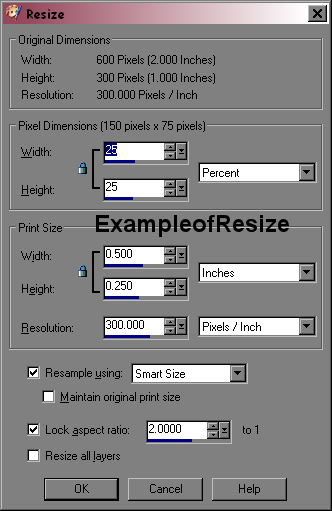
I say it's re-sized down to 25% , but you may say it differently...
Always sharpen after a re-size
You are going to rotate it to the right by 45% (use your freehand rotate option)
add a drop shadow to the element to make it stand out..
Open cds_db_fireworks1 paste it behind the heart, and sharpen it, then add a drop shadow to that layer.
I am using cds_db_pp12 for the fill on my font, and the red from the heart as the outline on the font
the font i'm using can be found Be Safe Font
You will need to add a gradient glow of white under the font,( you will use Eye Candy4000 Gradient Glow function) then add your default drop shadow. I centered the text with just a bit over the heart.
I am using cds_db_pp12 for the fill on my font, and the red from the heart as the outline on the font
the font i'm using can be found Be Safe Font
You will need to add a gradient glow of white under the font,( you will use Eye Candy4000 Gradient Glow function) then add your default drop shadow. I centered the text with just a bit over the heart.
Add your copyright's to the tag and save it.
Your done..
Tutorial is Copyrighted by LadyDragus
This tutorial was written by me, on May 21 2012
I'd love to see what you make with this tut..

Subscribe to:
Post Comments
(Atom)
Kit Match For


Stores I Sell At


Blog Trains for HODG






Forums


Blogs I follow


.gif)



















0 comments:
Post a Comment
Thank you for reading my tutorials and snagging my snags. I design under House of Dragus Graphics by LadyDragus